In this short webinar we answer the question:
"How can we enforce password policies for external (non-AD) users?"
Wednesday, February 07, 2018

Wednesday, January 24, 2018
Prevent Hackers - SharePoint Extranet Security
Here is the recording of today's webinar, conducted by Johnathan Horton:
Wednesday, September 27, 2017
Setting Up Office 365 Extranet
While trying to configure a 2016 hybrid SharePoint
environment, I wanted to explore the features of a O365 Extranet. Having never
set one up before, I turned to Microsoft for articles on how to simply set it
up. I found many articles on what they were and why they would be useful, even
pitfalls to avoid. However, I never came across a step by step guide, or if I
did, it seemed like it was written pretty early in the lifecycle and Microsoft
had already made changes to the product that made the article null and void. So,
I ended up spending vast amounts of time getting my environment set up and
configured as securely as possible. It is possible that I am spoiled as
Extranet Collaboration Manger for On Prem takes about 10 minutes using the
helpful wizard. What you find below are the notes of the steps that I took.
Hopefully you find these instructions and are able to get your o365 extranet
configured in much less time than it took me!
I should note that before enabling external sharing for SharePoint,
you'll have to make sure it's enabled for your Office 365 tenant as a whole.
This can be found under the Security & Privacy tab of your Settings menu
within your Tenant Admin Console. There, you can control external sharing
globally first.
- From the Tile screen click on admin
- Next click on Security & privacy link in the left Nav

Monday, September 11, 2017
Allowing Site Sponsors to View Registrations and Invitations List
“Extranet
Collaboration Manager”, or ExCM, was designed to leverage SharePoint’s native
permissions levels, and, in a few cases, add some additional security
capabilities that can help an organization to better secure and govern
SharePoint usage in an extranet scenario. One of these additional
features is ExCM’s Site Sponsor feature.
Below are the steps you can use to set up your Site Sponsor to view the Registrations and Invitations for a site collection:
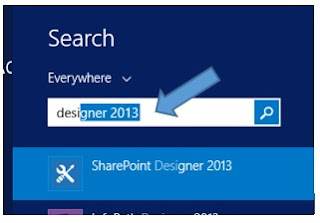
From your Windows Explorer, open your “SharePoint Designer” program.
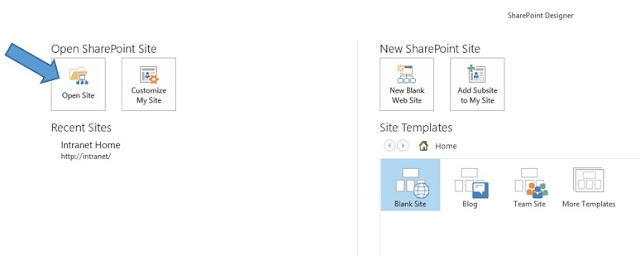
Once your SharePoint Designer is open, click on “Open Site.”
An ExCM Site
Sponsor is a special permission level that can be granted to any user (internal
or external), regardless of the SharePoint permission level that user
has. Once granted the Site Sponsor permission, the user is able to manage
a pre-defined set of external user accounts in a given extranet site.
(Read more about the ExCM Site Sponsor feature here.)
In many cases
a Site Sponsor is able to do everything she needs to do by simply using the
out-of-the-box settings. However, one thing that a Site Sponsor cannot do
out-of-the-box is see the list of Extranet Invitations and Extranet
Registrations for her site. This is because both of those lists are
automatically maintained by ExCM at the Site Collection level and by default
require Site Collection Administrator permissions. Sometimes we are asked
how this can be “tweaked” so that Site Sponsors can see these two lists.
Below are the steps you can use to set up your Site Sponsor to view the Registrations and Invitations for a site collection:
From your Windows Explorer, open your “SharePoint Designer” program.

Once your SharePoint Designer is open, click on “Open Site.”

Setting up Anonymous Registration
When dealing with Extranets, the primary job of a Farm Administrator is to make sure their Extranet is set up with the proper security to only allow users who are part of the organization or who are invited to have access to an extranet site collection. They are the “Gatekeepers” of your Extranet.
“I am the Key Master... are you the Gatekeeper?”

(Ghostbusters 1984)
“I am the Key Master... are you the Gatekeeper?”

(Ghostbusters 1984)
Friday, August 25, 2017
Setting Up Anonymous Registration Auto Approval Using a Domain Policy
 |
| "Just set it and Forget it..." |
However, with Extranet Collaboration Manager (ExCM) you can use a domain name security policy for anonymous registrations, and literally do just that. Like the legendary salesman and TV marketer Ron Popeil of Ronco has said tens of thousands of times in his TV ads, you can, "Just set it and forget it."
In our example scenario, the organization AW Bikes has just finalized a large contract with ACME Corporation. AW Bikes will be supplying ACME with all the required bikes on location for any new projects. All ACME will need to do is fill out the required form and submit it to AW Bikes, and then they will make sure the required bikes are shipped to the project location.
AW Bikes knows that ACME has projects taking place all over the world with many different project managers who will need access to the form. AW Bikes needs access to the form to be easy and secure, but they do not want to have to add or invite, then approve every new ACME project manager to the extranet site. So they ask PremierPoint Solutions if we might have an easier solution.
Our suggestion is to set up Extranet Collaboration Manager’s anonymous registration feature with auto approval using a domain name policy. Here is how it would work:
Thursday, August 03, 2017
Customize ExCM's Responsive Sign-in Page
Want a highly-polished, great looking extranet portal without engaging a
skilled graphic designer and web developer? So do we! If you figure out how, let us in
on the secret. Until that is possible, we can give you a few tips on turning ExCM's new out-of-the-box responsive extranet sign-in page into a slightly customized page. If you just want to personalize
the page with custom wording and maybe an image, read on because we can help you see how to do that.
Extranet Collaboration Manager (ExCM) for SharePoint 2013 R2 and 2016 now ships with an optional responsive sign in page
located here: /_layouts/spsolutions/excm/responsive/signin.aspx

Monday, March 27, 2017
Decomission That Old Server (Move Extranet Service)
So you have an old Web Front End server. It has been a good
‘un (as we say in the south) a real work horse, but for numerous different
reasons, it is time to “decommission” the ole gal and get a new work horse in
place. You are going to keep the old WFE in place while you build up a new one
and get them to look identical before taking the old one offline. One problem,
you notice you are running this extranet service and you cannot get it
installed on the new server. What is a horse farmer, I mean server admin to do?
First, Add the new server to the farm. Provision all necessary services
except those that can only run on one server (like UPS and probably Search
topology and of course the Extranet Service). For the rest of these steps, I
will only focus on the ExCMExtranetService, additional services will need to be
deployed as needed in your environment.
Next, stop the ExCM Service.

Wednesday, March 15, 2017
Business Extranets that are Cost-effective and Highly-secure
In this webinar we cover many of the features that make SharePoint a highly-secure and cost-effective business extranet platform:
Monday, March 13, 2017
Upcoming Webinar: Business Extranets that are Cost-effective and Highly Secure
We'll be conducting a one hour webinar on cost-effective and highly secure business extranets on Wednesday, March 15 at 11:00 a.m. EDT.

To attend, go register here: https://attendee.gotowebinar.com/register/5539599446641350659
Here is the description for what we will be covering:
Join us for an informative look at how to use SharePoint (2016, 2013, or 2010) to provide cost-effective, highly secure, and user-friendly on-premises business extranets for collaboration with customers, vendors and other business partners.
We will look at techniques for:
Questions are welcome during and after the webinar.
We'll be doing the demos using SharePoint 2016, but SharePoint 2010 and 2013 are still applicable as well.
Come join us and learn about how to have a business-grade extranet!

To attend, go register here: https://attendee.gotowebinar.com/register/5539599446641350659
Here is the description for what we will be covering:
Join us for an informative look at how to use SharePoint (2016, 2013, or 2010) to provide cost-effective, highly secure, and user-friendly on-premises business extranets for collaboration with customers, vendors and other business partners.
We will look at techniques for:
- Allowing internal users to easily and securely invite external business partners to join private extranet collaboration sites
- Automatically enforcing security and governance policies as external users create accounts from invitations and join sites
- Oversee and govern external user Forms-based Authentication (FBA) accounts with minimal workload for SharePoint Administrators
- Automating the extranet site request and provisioning process for extranet sites to ensure that it is fast and easy for users to obtain properly provisioned sites as new customers\vendors\projects are initiated
Questions are welcome during and after the webinar.
We'll be doing the demos using SharePoint 2016, but SharePoint 2010 and 2013 are still applicable as well.
Come join us and learn about how to have a business-grade extranet!
Subscribe to:
Posts (Atom)